Are you a federal firearms license (FFL) holder interested in joining the growing industry of firearm ecommerce? The strict regulations surrounding firearms (which vary by state) can make this seem like a daunting task, especially if you’re starting this journey on your own. On top of that, you need the technical knowledge to actually build a website as most quick build platforms (like Shopify) do not allow the sale of firearms.
After working with multiple FFL dealers and firearm retailers to build WooCommerce websites, I’ve seen firsthand where most online gun stores fail especially when it comes to compliance, checkout flow, and payment processing. I created this guide to help you avoid those mistakes and launch your store the right way from the start. With the right approach, you can launch a compliant, professional online store without wasting months on trial and error or thousands of dollars fixing avoidable mistakes.
Disclaimer: I am a professional web designer and not an FFL. This article is for informational purposes only and does not constitute legal advice.
What You’ll Learn
This article will discuss the step-by-step process to set up a WooCommerce store tailored to the sale of firearms. From a high level, we’ll discuss legal considerations, compliance messaging, essential features and common mistakes to avoid.
If you want a faster path, you can also start with a pre-built firearm website template instead of building everything from scratch.
Why Start an Online Gun Store in 2026? (Market Opportunity & Trends)
Before we dive into how to build your online gun store, it’s important to understand why having a website is no longer optional, it’s a competitive necessity. Without it, your business will miss out on potential revenue as customers happily shop on a competitor’s site. The reality is simple, if customers can’t browse your inventory online, they’ll find a competitor who lets them.
If you’ve been in the FFL industry for a while, you’ve probably heard of the website Guns.com, which reported a 16% growth in online annual sales during 2025 (Fidelity). This reflects the continued growth of ecommerce as consumers prefer online convenience over the traditional in-store experience. As a small business, every potential revenue stream matters. That’s why it is becoming increasingly important to showcase your store’s products online, even if you only sell those items in-store.
Legal Requirements for Selling Guns Online (What You Must Know)
Before you start building your online gun store, it’s critical to understand that selling firearms online is not the same as traditional ecommerce. There are strict federal, state, and local regulations that govern how firearms are sold, transferred, and delivered to customers.
Unlike standard online purchases, firearms cannot be shipped directly to a customer’s home in most cases. Instead, transactions must go through a licensed Federal Firearms License (FFL) dealer, which adds an extra layer of compliance and operational complexity to your website.
Because of this, your online store isn’t just a place to list products—it must be designed to support compliant workflows, proper documentation, and clear communication with your customers throughout the buying process.
Getting this wrong can lead to failed orders, chargebacks, or even legal issues. That’s why understanding these requirements upfront is essential before you start building your site.
Do You Need an FFL to Sell Guns Online?
Yes, if you plan on dealing firearms in the United States you will need an FFL. You can read all the requirements on the Bureau of Alcohol, Tobacco, Firearms and Explosives (ATF) website.
How Online Gun Sales Actually Work (FFL Transfer Process)
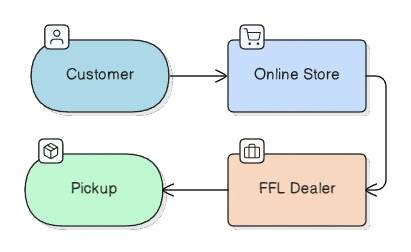
Many of you may be aware of the process behind buying a firearm online. If you’re not, it can be summarized in 4 steps.
- The customer contacts a local FFL that agrees to accept the transfer of a firearm.
- The customer buys the firearm from an online dealer and informs them they would like it transferred to their local FFL.
- The online dealer goes through the legal transfer process. If completed successfully, the online dealer ships the firearm to the customer’s local FFL.
- The customer completes all necessary paperwork at their chosen FFL and picks up their purchase. The local FFL almost always charges a fee.
This is only a summary of the process as I am not an FFL myself. If you would like to read more about the process, here is a more detailed article from Keystone Shooting Center in PA. Always check both federal and state regulations to ensure your firearm transfer stays fully compliant.
State & Local Regulations
Every state takes a different approach to regulating the firearms industry, and on top of that regulations change fairly often depending on where you may live or do business. It is detrimental that as a firearm dealer you are well versed in your local and state laws, as well as the laws of states you may be dealing in.
Payment Processing Restrictions
Many of the industry leading payment processors consider the firearms industry “high-risk” and will not support the processing of firearm related payments. Two well-known examples are PayPal and Stripe. That means your website needs to have the flexibility to integrate with other payment processors.
Not all website platforms make this easy, which is why choosing the right setup from the beginning is critical.
Choosing the Right Ecommerce Platform for a Gun Store
Now that we understand some of the broader firearm industry requirements, let’s dive into actually building a website.
Why Most Platforms Don’t Work for Firearm Sales
For almost all businesses moving into ecommerce, I would recommend using Shopify due to its leading customer conversion and ease of use. Unfortunately, Shopify does not support the sale of firearms so that is not an option here. The same can be said for many more of the drag and drop type website builders such as Wix, Webflow, and so on. While there may be some lesser known platforms out there, my recommendation for FFL dealers is to build their website with WordPress and WooCommerce due to the basically unlimited flexibility and scalability offered.
If you’re unsure how to set this up properly, starting with a system already built for firearm sales can save you a significant amount of time.

Why WordPress + WooCommerce Is the Best Choice
WordPress is a well known blogging platform that can be partnered with ‘plugins’ to enhance its features. Think of these plugins as apps you download, except for your website instead of your phone. WooCommerce is a free WordPress plugin that turns your website into a fully functioning ecommerce store. With the extremely vast plugin market, WordPress is one of the most flexible website building platforms as there is basically a plugin for every little feature you could think to add to your website. This is extremely important because you can constantly update, redesign or revise your website to scale with your growing brand.
This level of flexibility is critical in the firearm industry, where small mistakes in setup can lead to compliance issues or broken checkout experiences. It’s also where most generic web designers and DIY builds fall short. This is exactly why many firearm retailers choose to start with a pre-configured system instead of building everything from scratch.
Real-World Requirements Your Platform Must Support
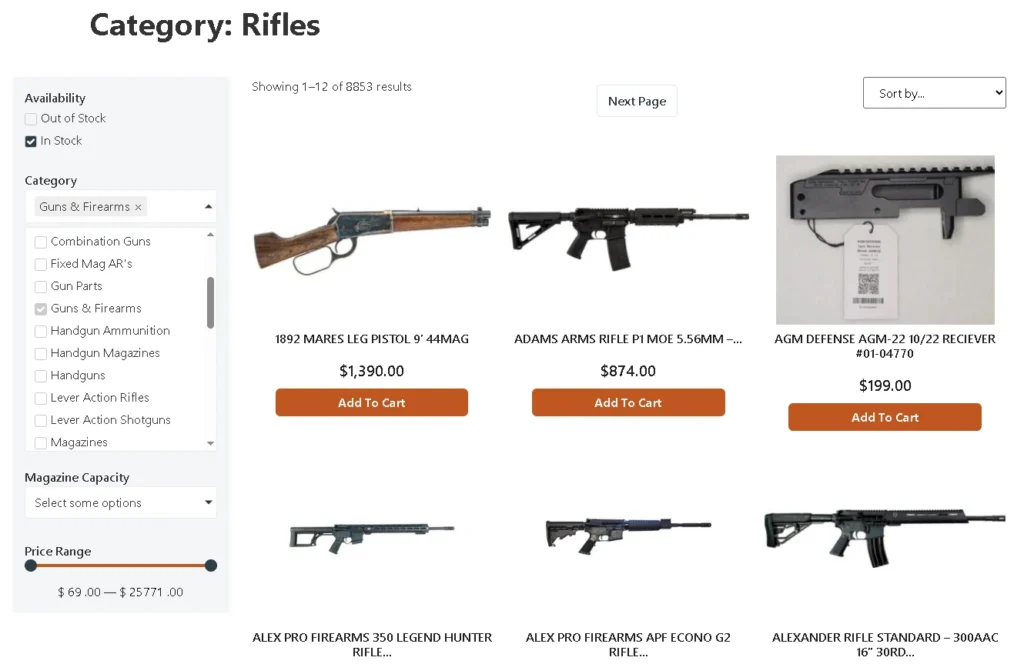
In terms of our firearm website, WordPress allows you to build compliance messaging, FFL selection for your customers, distributor integration for dropshipping firearms, age verification, and so much more. You also own 100% of your website meaning you can change any detail you want, and you can spend as much or as little as you want to keep it running.
Step-by-Step: How to Start an Online Gun Store
Now that we have laid the groundwork for your foundational understanding of the online firearm industry, we can discuss how you (yes you!) can start your own online store with WordPress and WooCommerce.
Step 1 – FFL & Business Setup
The first step of course is to make sure you have the proper paperwork to start dealing firearms. Apply for your FFL license with the ATF as this can be a lengthy process.
While doing this, you can purchase a website domain for your business. A website domain is the link people visit to see your website. Although I have no affiliation, I recommend you sign up at Cloudflare to register your domain. They have some advanced features that may be useful down the road. It will cost you roughly $10 annually for your domain name, and should only be about $10 to buy it initially, as long as you aren’t trying to purchase a domain name that is already owned by someone else.
Step 2 – Secure Payment Processing
After receiving your FFL, you need to partner with a reputable payment processor that is willing to accept high-risk payments. If you are already running a brick and mortar store, you can ask your existing payment processor if they support payment processing for a WordPress/WooCommerce website. Otherwise, there are many payment processors to choose from that are built to run with WordPress and WooCommerce.
You can use Google to research the different options and compare the differing fees they charge. Pick the one that is best for you. Not all website platforms make this easy, which is why choosing the right setup from the beginning is critical.
This is another area where having a properly configured WooCommerce setup can save you from compatibility issues later on.
Step 3 – Choose Hosting
Before you can start building your WordPress website, you need to select a website hosting company that will store all the data from your website. Prices for website hosting can vary from a few dollars a month to thousands of dollars per month. The key factors to consider are:
- Your monthly budget
- This one is straight forward. How much are you willing to spend per month?
- The reliability of the hosting
- Reliability refers to the uptime of your website. Websites can be taken down due to server maintenance, hacking attempts and more. Your hosting provider should provide information on how reliable their services are.
- Performance (website speed)
- A slower website will rank lower on search engines such as Google and Bing. Performance of your website is heavily impacted by the quality of your hosting provider.
- Security considerations
- Weak hosting security can leave your store vulnerable to attacks, downtime, or data breaches. None of which you want when handling customer transactions.
- Website Maintenance
- Every website requires maintenance to ensure all features are running smoothly and any bugs are patched. Do you want to maintain your own website or hire an experienced professional to maintain your website for you? Many hosting providers provide a maintenance service with their hosting.
We offer full maintenance and hosting plans with greater than 99.9% website uptime reliability, advanced security and industry leading performance powered by WP Engine. We handle updates to all your plugins, themes and WordPress core. For many FFL dealers, having this handled professionally removes a major technical burden and allows you to focus on running your business.
WordPress is something you will have to install with your chosen website host. Many platforms offer pre-configured WordPress installations, or 1-click WordPress installs. If you are planning on building your website yourself and are not experienced with WordPress, I highly recommend you use a hosting provider that will set up your WordPress install for you.
Step 4 – Build Your Website (Where Most Stores Fail)
Assuming you have selected a hosting provider with WordPress installed, you can now access your WordPress website. Congrats, you just created your website! The only problem is… none of your content is built yet. This is where you should decide how involved you want to be with the creation of your website design. Do you want to hire a designer to build you a completely custom website, or do you want to get started with anything that is user friendly and looks professional?
You can build your site yourself, but this is where most firearm retailers run into serious issues. Between compliance requirements, payment processor integration, and FFL transfer workflows, this is not a typical ecommerce build. Small mistakes here can break your checkout or create legal risk.
Most firearm retailers spend weeks trying to piece this together and still end up with a broken or confusing checkout process. If you want to launch faster with a system that’s already built for firearm sales, you can start with a conversion-optimized template or work with us on a fully custom build.
For the purposes of this article, I am going to skip the overall design process and will focus on setting up the key features for selling firearms on WordPress with WooCommerce.
Step 5 – Configure WooCommerce for Firearm Sales
This is where many store owners underestimate the setup required, especially when dealing with restricted products like firearms.
The first step to creating your WooCommerce store is installing the WooCommerce plugin. After installation, you will be prompted to follow a few setup steps including creating products, connecting your payment processor, creating tax rules, and setting up shipping zones to calculate shipping costs. You can find shorter guides for all these items individually so I won’t go in depth on any of these topics.
WooCommerce will automatically create pages for you such as:
- Customer account
- Cart
- Checkout
- Shop
- Individual product pages
- Individual product category or tag pages
- A draft refund & return policy
All the basics you need for running your own ecommerce shop. If you want to integrate distributor feeds into your online product catalog, I recommend not creating any products on your own yet.
Step 6 – Set Up FFL Transfer Workflow
Many FFL dealers have different approaches to handling FFL transfers. Some prefer to have customers call or email to provide the information for the FFL they want their firearm shipped to. This approach quickly becomes disorganized and is one of the most common causes of order errors, delays, and even chargebacks. This is one of the biggest differences between a standard ecommerce store versus a firearm store, and one of the most common places where DIY builds fail.
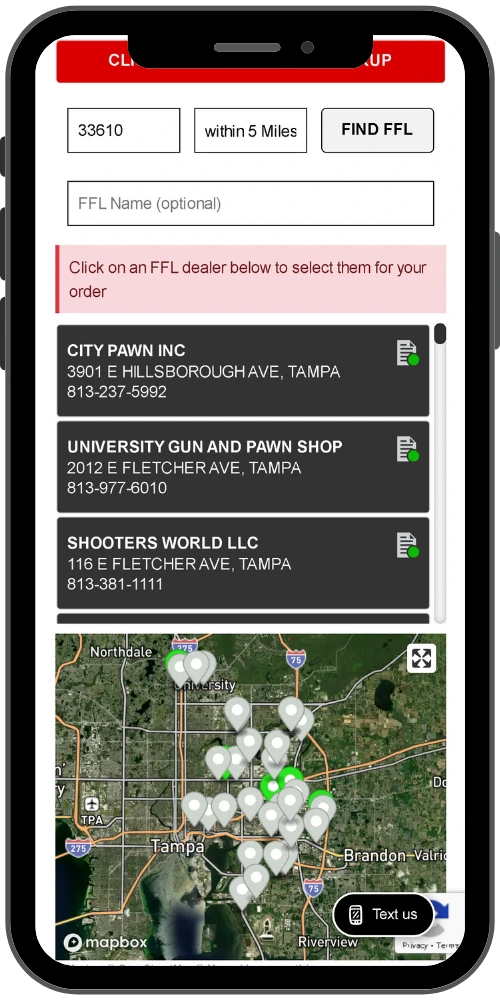
The solution to this is providing customers a form during checkout to fill out with their desired FFL.
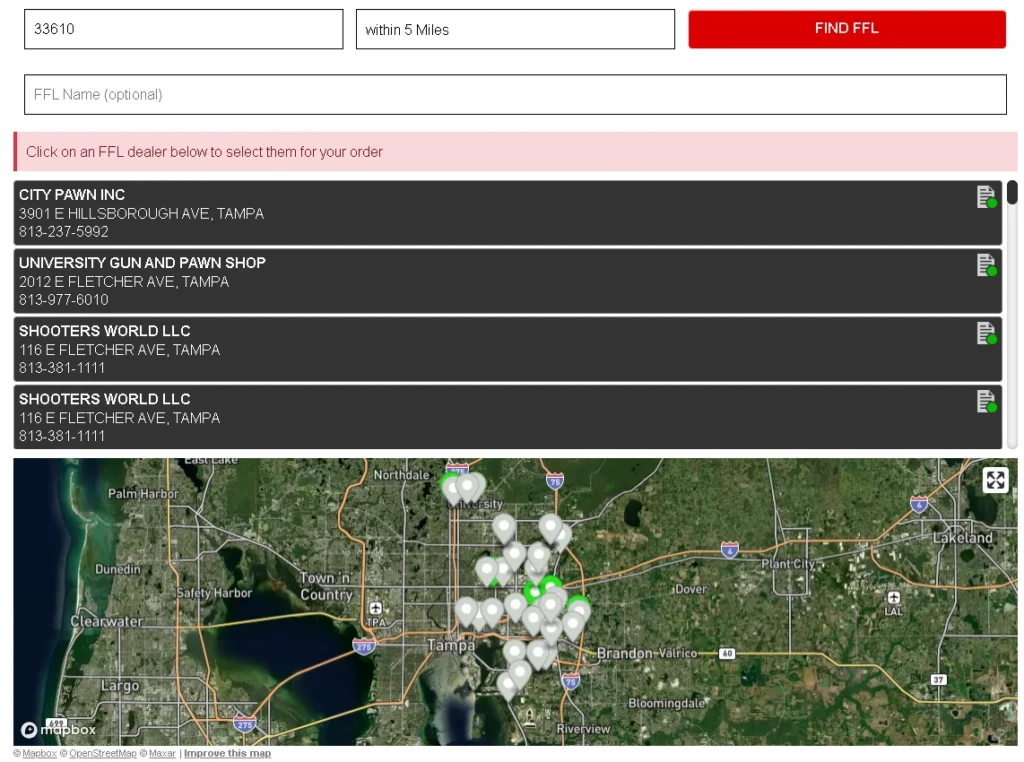
My recommendation to solve this issue is to use the FFL Checkout plugin. It populates the WooCommerce classic checkout field with a map feature allowing customers to search for FFLs near them. It may take some custom styling to make this look nice in your checkout, but it is extremely convenient for processing FFL transfers. The plugin does come with a monthly price of $15.99 at the time of writing. Getting this step right has a direct impact on your order accuracy and overall customer experience.
Step 7 – Add Compliance Features
There are several critical compliance elements your website must include to ensure you are compliant with federal, state and local laws regarding firearm sales. The first item you will want to add to your site is an age verification popup to ensure visitors confirm they are of the legal age to purchase a firearm in your area. Next, you’ll want to ensure your website has pages describing legal policies such as a Privacy Policy, a Terms of Service, and a Refund and Return Policy. On these pages, you can list all your legal policies regarding information collected from the customer as they view your website and make purchases.
All of our templates also come with a “Buying Process” page that explains the FFL transfer process to any customers that are new to the firearm industry. I would recommend adding a similar page to your website to reduce potential confusion.
Step 8 – Test Your Checkout & Workflow
Once you’ve finished the setup and design of your website it is time to test all of your site features including your internal workflow for processing orders. Ensure your payment processor is put into a test mode so you avoid charging yourself and avoid paying any fees. Once enabled, go through the process of purchasing a firearm on your site. Try to be critical of how user friendly it is to purchase something. Any unnecessary restrictions will lower your conversion rate.
After purchasing an item, your test account should receive an email with a receipt. The test account should also be able to see past orders in the WooCommerce account menu. Have your employees or yourself go through the process of fulfilling the order as well.
If everything is smooth and successful, you’re ready to launch a functioning store! Just make sure you turn off the test payments mode with your payment processor.
Step 9 – Launch & Promote Your Store
Let’s talk about launching your store. For WordPress & WooCommerce, it is as easy as selecting a button to make your store public to take down the default “Coming Soon” page. Now that your store is open to the public, how do you drive visitors? There are several ways to market your new website.
If you already have an existing brick and mortar store I heavily recommend creating or claiming your Google Business Profile (GBP). Whenever someone in your area searches for “gun store near me” on Google the top results come from GBPs. This is true for any business type. Capturing this traffic is essential to growing locally in your city, town or state. Google is stricter on online businesses so you may not be able to create a GBP if you aren’t operating out of a storefront.
Other options that will work for online only FFLs are paid ads, social media, and posting content on your website. WordPress is designed for creating blogs. Creating blog posts is a free way to grow your website allowing more customers to stumble across your business. Although this is a free approach, you will have much better results running paid ads as you can target specific demographics. While these are all great areas, the strategy that will work best for you depends on your current situation.
What Most Gun Store Website Guides Get Wrong
Most guides on starting an online gun store focus on surface-level advice like “pick a platform” or “add products.”
What they don’t cover are the parts that actually make or break your store:
- Setting up a compliant and user-friendly checkout process
- Handling FFL transfers without creating operational chaos
- Integrating payment processors that actually work for firearm sales
- Avoiding UX decisions that hurt conversion rates
These are the areas where most firearm websites struggle and where the difference between a store that gets traffic and a store that actually makes sales becomes very clear.
This is also why many FFL dealers eventually move away from DIY builds and invest in a system that’s built specifically for their industry. These are exactly the types of problems our templates and custom builds are designed to solve from day one.
Must-Have Features for a High-Converting Gun Store Website
Not all gun store websites are built to convert. While many sites focus on listing products, the highest-performing stores are designed around the unique requirements of firearm sales—balancing compliance, usability, and a seamless checkout experience.
Because of the added complexity of FFL transfers, payment restrictions, and legal requirements, your website needs more than just a standard ecommerce setup. It must guide customers clearly through the buying process while minimizing confusion and friction at every step.
The features below are not just “nice to have”—they are critical components that directly impact your conversion rate, order accuracy, and overall customer experience.
FFL Dealer Selection Tool
In my opinion, it is an absolute must to have your checkout workflow include a way for your customers to select which FFL they want their firearm transferred to. As I mentioned earlier, my recommendation is to use the FFL Checkout plugin. It is made by an FFL that knows the ins and outs of the industry. It is easy for your potential customers to select their local FFLs based on a map and a zip code search feature. The plugin costs $15.99 as of early 2026 and I do not receive any compensation if you sign up.
Mobile Optimization
Mobile performance is no longer optional. It’s where the majority of your customers are browsing and buying. According to Statista, in 2025 smartphones accounted for nearly 80 percent of all retail website visits worldwide and generated the majority of online orders. That means your website should be built prioritizing mobile traffic. Everything on the website should be easy to use and load quickly on a customer’s phone.
All of these features are built into our templates and custom builds so you don’t have to piece them together on your own.
Common Mistakes When Starting an Online Gun Store
Some of the most common mistakes I see on industry firearm websites are:
- Using the Wrong Platform
- Starting on a platform with limited flexibility often leads to a full rebuild later, costing time and money.
- Ignoring Compliance in the User Experience
- Compliance is critical but when implemented poorly, it creates friction that drives customers away.
- Poor Checkout Design (Kills Conversions)
- If a customer is confused during your checkout process they are not going to ask for help. They will leave your website.
- DIY Builds Without Understanding Complexity
- What seems like a cost-saving decision often turns into weeks of frustration, broken functionality, and lost sales.
Avoiding these mistakes early can save you months of frustration and lost revenue. If you want a system that’s already built around these challenges, our WooCommerce templates and custom builds are designed specifically for firearm retailers.
At this point, the biggest decision is how you want to approach building your site.
Should You Use a Template or Custom Build?
Naturally, you may be wondering which direction to take your business. It really depends on your current goals and ambitions for your business. Are you passing time with your favorite hobby or building your full-time job? Let’s discuss the advantages to each path to help you decide.
When a Template Makes Sense
Templates are great if you have a low budget, have little experience with WordPress, and/or just want to dip your toes into the FFL industry. You may be starting your business, exploring the different options out there, or just enjoy being an FFL as a hobbyist. In these cases, I would recommend starting with a cheaper template rather than a completely custom build.
Don’t buy only a theme template though. I recommend buying a built-out package that includes necessary plugins and even paying for a full setup if you are not familiar with WordPress and WooCommerce. This will pay you dividends in the amount of time you save yourself and will allow you to start selling your products faster. This is the fastest way to get a professional, functional store online without starting from scratch.
When You Need Custom Development
Anyone can benefit from a custom built site as it makes your business stand out from competition. You can have your web designer create specific pages that are more personable fostering better connections and higher trust with customers. Which will in turn increase your conversion rates and number of return customers. It does come with an increased price tag as your designer will be building everything up from scratch. Therefore, I recommend starting with a custom website if you have the budget to spend on it. For example, established businesses that are looking to create or redesign their website on the WordPress platform would benefit in more ways from a custom design than a template.
Not sure what you need? Contact us for a quick consultation. We’ll recommend the best path based on your goals.
Launching Your Gun Store the Right Way
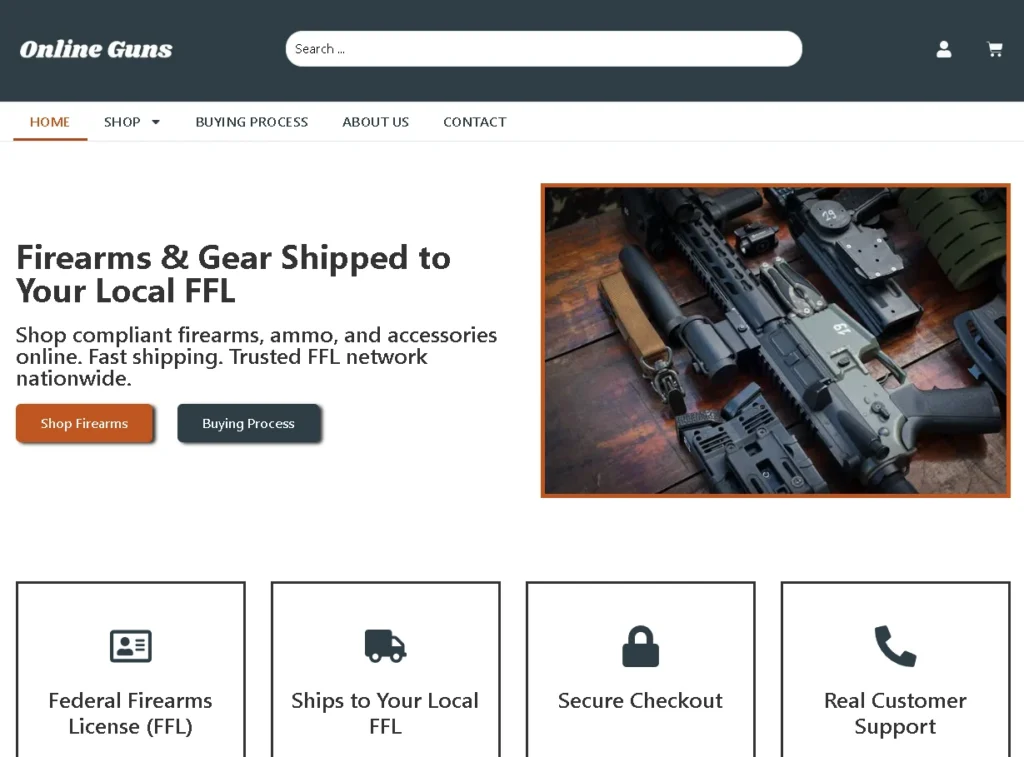
Building out the perfect FFL website can be complex, but it is also incredibly rewarding when done professionally. Ensuring you include all the necessary compliance features without overcomplication creates a beautiful user experience leading to increased sales rates. By starting with the correct approach, you can build on your website year over year without needing to tear everything down and start over again. There is also something satisfying about completely owning your own website and knowing that you have control over every minute detail. That is why I will always recommend using a platform such as WordPress with WooCommerce.
If you’re serious about launching your online gun store, the most important decision you’ll make is how you build it from the start.
You can browse our firearm-ready WordPress templates to launch quickly, or contact us for a custom WooCommerce build tailored to your business and long-term growth.